Find the number of unique days each employee worked ?

Problem Statement :  Find the number of unique days each employee worked ?

Table Name : unq_days 


Expected Output : 

Script to Populate the Above sample table Data : 

create table unq_days(
emp_id number,
task_id number,
start_dy varchar2(20),
end_dy varchar2(20)
);

insert into unq_days values(2,1,'Tuesday','Wednesday');
insert into unq_days values(2,1,'Monday','Friday');
insert into unq_days values(1,3,'Friday','Friday');
insert into unq_days values(1,2,'Monday','Tuesday');
insert into unq_days values(1,1,'Monday','Wednesday');

Solution: 

Step 1:- Create a table to find the days between and populate the data as per below script 

create table days_table (
id number (2) ,
weekdays varchar2(20));

insert into days_table values (1,'Monday');
insert into days_table values (2,'Tuesday');
insert into days_table values (3,'Wednesday');
insert into days_table values (4,'Thursday');
insert into days_table values (5,'Friday');
insert into days_table values (6,'Saturday');
insert into days_table values (7,'Sunday');

Step 2:- Create a function to convert the days into a number value which we can use to find the range of between in step 3 . 


CREATE OR REPLACE FUNCTION Fn_days_working(i_days varchar2) 
RETURN number IS 
   v_id number :=0 ; 
BEGIN 
   SELECT id into v_id  
   FROM days_table t where t.weekdays=i_days; 
    
   RETURN v_id ; 
END; 


Step 3:-  Final query 


SELECT Emp_id , count(1) from (
with tab  as (
select t.emp_id , LISTAGG(t.working_days,',') wrdy from 
(
select ud.emp_id , 
(select LISTAGG(distinct t.weekdays ,',')from days_table t 
where t.id between Fn_days_working(ud.start_dy) and Fn_days_working(ud.end_dy) 
) working_days 
from unq_days ud 
) t 
group by t.emp_id
)
SELECT DISTINCT emp_id, trim(regexp_substr(wrdy, '[^,]+', 1, LEVEL)) str
 FROM TAB
   CONNECT BY LEVEL <= regexp_count(WRDY, ',')+1
) 
group by emp_id ; 


I am interested in hearing your feedback about this article , So that I can improve my lab series on sql for you.connect with us on facebook

Share

Did you enjoy reading this and found it useful? If so, please share it with your friends: 


C INTERVIEW QUIZ SET:-2

Before submitting please remember below two points :-
1.In section 1 please enter your valid mail ID else you won't be able to submit the quiz and view the score of the quiz.
2.In section 2 please enter student details.

If you enjoy giving this quiz and found it useful? If so, please share it with your friends.

Note : If anyone is interested for demo interview then you can drop your CV to mail ID :etechdeeksha@gmail.com

Data Structure and Algorithm

Before submitting please remember below two points :-
1.In section 1 please enter your valid mail ID else you won't be able to submit the quiz and view the score of the quiz.
2.In section 2 please enter student details.

If you enjoy giving this quiz and found it useful? If so, please share it with your friends.

Note : If anyone is interested for demo interview then you can drop your CV to mail ID :etechdeeksha@gmail.com

SQL INTERVIEW QUIZ SET:-2

Before submitting please remember below two points :- 1.In section 1 please enter your valid mail ID else you won't be able to submit the quiz and view the score of the quiz.
2.In section 2 please enter student details.

If you enjoy giving this quiz and found it useful? If so, please share it with your friends.

Note : If anyone is interested for demo interview then you can drop your CV to mail ID :etechdeeksha@gmail.com

Mobile App Development Setup

In this section will cover the list of software and download link which are required to build a mobile apps as well as hybrid apps development using ionic.

Part 1 : Downloading the Prerequisites

1.Node.js :
https://nodejs.org/en/download/
To check the installation execute the command node -v

2.VS Code :
https://code.visualstudio.com/download

3. Android Studio :
https://developer.android.com/studio

4.Xcode :You need a Mac to build apps for iOS.
https://developer.apple.com/xcode/

Part 2 : Installing Ionic and Cordova CLIs

1. To install Ionic CLI globally execute the below command in terminal / cmd prompt
npm install ionic -g 
To check the installation execute the command ionic -v 


2. To install the latest version of Cordova CLI , Globally execute the below command in terminal / cmd prompt
npm install cordova -g
To check the installation execute the command cordova -v 

Note : For mac install with sudo privilege 

I am interested in hearing your feedback about this article , So that I can improve my lab series  for you.connect with us on facebook, YouTube

Share

Did you enjoy reading this and found it useful? If so, please share it with your friends: 

Export Import Schemas level using data pump

 In the previous section we have done Table level export import now we will do the schema level import export  .
We will use the directory which we have already created in table level export section. Please visit the below link  for Table level export import:


and follow the steps 2,3,4 if you are have not created any directory else you can use your created directory.

Once the directory created please follow the below steps to export schemas:

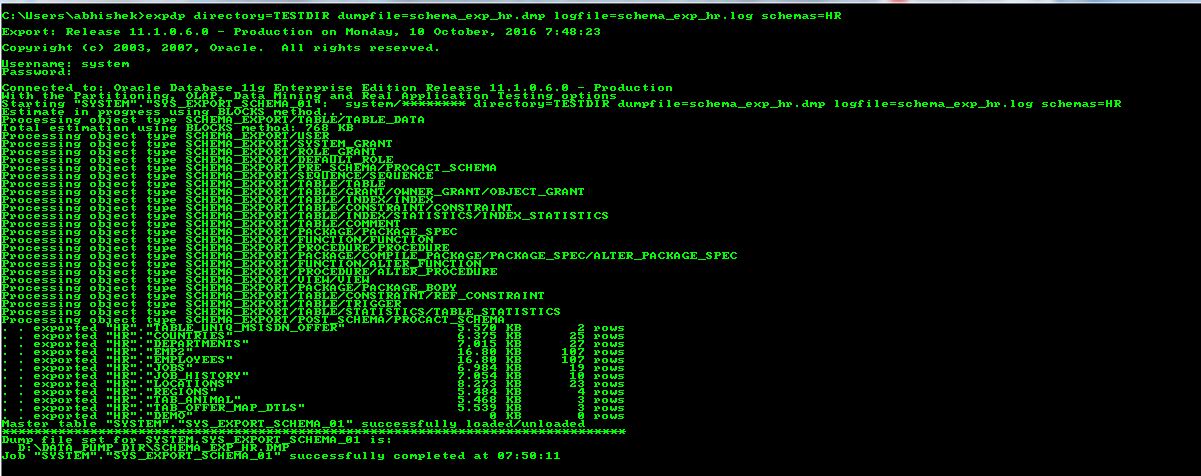
Step 1:- Export HR Schema
expdp directory=TESTDIR dumpfile=schema_exp_hr.dmp logfile=schema_exp_hr.log schemas=HR

Step 2:-Once export done please check the log schema_exp_hr.log

Step 3:- Now drop the HR schema along with all the objects inside it
Drop user hr cascade;

Step 4:- Import the HR schema again
impdp directory=TESTDIR dumpfile=schema_exp_hr.dmp logfile=schema_imp_hr.log schemas=HR

Step 5:- Once imported please check the log file :schema_imp_hr.log 
and then try to log in with the HR log in credential .

REMAP_SCHEMA command will add objects from source schema to target schema
For Expample :The hr schema into the existing HRNEW schema.
if user HRNEW already exists before the import, then the Import will import all the object
else it will create HRNEW schema and then import all the object .

impdp directory=TESTDIR dumpfile=schema_exp_hr.dmp logfile=schema_imp_remap_hr_newhr.log remap_schema=HR:NEWHR


Related Article :

I am interested in hearing your feedback about this Export and Import using data pump , So that I can improve my lab series on sql for you.connect with us on facebook, twitter

Share

Did you enjoy reading this and found it useful? If so, please share it with your friends: