Showing posts with label mysql. Show all posts

Cross join

In this lesson we are going to study about Corss joins in a database.
Cross Join  or Cartesian Product:

  • Each row from the first table is combined with the each rows from the second table.
  • Rows in the result table is the product of rows in each table.
  • For large no of rows ,it takes longer time.
  • It does not include any join condition .
  • A Cross Join B Result table as  A*B.
Example1:In the below diagram we are having two table's Table:A,Table:B .Table:A is having one column X

with three data and Table:B is having one column Y with two data.So the value of  m=3 and n=2.
So when we are doing cross join of Table:A with Table:B this will return a table which have
m*n =3*2
       =6(Record)
i.e each row of one table is mapped with each row of second table.


Example2:  In the below diagram we are having two table's Table:R,Table:S .Table:A is having Two column A,column B

with three data and Table:S is having two column B.column C with two data.So the value of  m=3 and n=2.
So when we are doing cross join of Table:A with Table:B this will return a table which have
m*n =3*2
       =6(Record)
NOTE: Result table is having all columns of Table:R,Table:S

Syntax:
Explicit cross join:

SELECT *

FROM Table1
CROSS JOIN Table2


Implicit cross join:

SELECT *
FROM  Table1 , Table2;

just have a look on below video and try to Cross Join table by your self and you can download the sql scrpit used in this video from here DOWNLOAD LINK

 Related Article
I am interested in hearing your feedback, so that I can improve my articles and learning resources for you.connect with us on facebooktwitter

Share

Did you enjoy reading this and found it useful? If so, please share it with your friends:

SIMPLE SQL SELECT STATEMENT


We are now steping into the important part of the database called the select statement.
    As we know data is store in the form of table in the relational database. Before getting deeply into the database here is the sample of how the data store in the form of table. Take a look of this table 


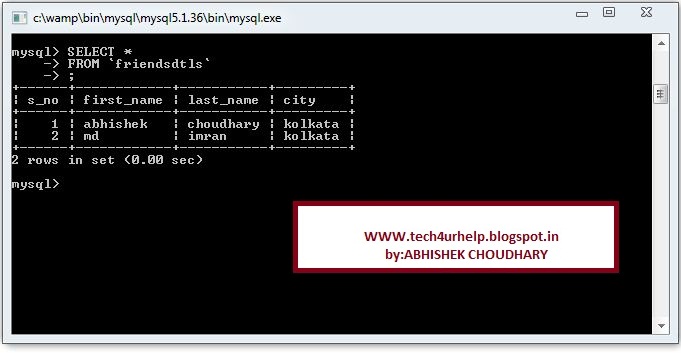
   In this table there are four columns s_no,first_name,last_name,city. The table data is store in a cell in a table cell is nothing but the intersection of row and columns. Generally the value of the table are store in a cell. We can store the different type of data in this cell. Take a look at this image Here we have given the query to select the rows from the table the database server processes this query and retrives the record from the database .


Use of SELECT statement:
  • Basic statement to extract the data from the table.
  • Retrives data from a table according to our needs.
     
Syntax: 

There are four main field to write a simple select query SELECT is the key word specifying we are going to select the data from the specific table list of column name or all columns name specify the column name or all columns name whose value we are going to select columns names are separated by commas (,) . if we want to select all column of the table then we specify asteric (*) instead of all column. From is the key word which specify where the value are store Table_Name is the name of the table where data is going to be retrieve and finaly we must put end of the select statement with semicolon (;) which is mendatory for all sql statement.

TABLE NAME:FRIENDSDTLS
Now we want to select the data of all field i.e all row and all columns sql query is :
Select * from friendsdtls;
If want to see the s_no,first_name, and city then the sql query is:
Select s_no,first_name, city from friendsdtls;
Here you go a sample video how to select data from table .you can view this video on my you tube channel as well @ http://youtu.be/r-A41Y50sXs
I am interested in hearing your feedback, so that I can improve my articles and learning resources for you.connect with us on facebook, twitter

Share

Did you enjoy reading this and found it useful? If so, please share it with your friends:

Inserting data Into table


In this section we are going to discuss data insertion into tables .
  • Insert statements is used to insert a data into a table.
  • Basic statements for data insertion .
Take a look on below image:

 Here we have given the query to insert data into the table the database server process this statements and insert a single row into the table in the database .
Syntex:

In this syntex INSERT INTO is the keyword that specifies the data insertion .Table_Name specifies the name of the table in which we are going to insert the data,columns name specifies the name of column in which we are going to give the value here we can specfies the desired columns name and if we wish to insert value for all columns of table so there is no need of specifing the each columns name .VALUES is the keyword that specifies the value we are going to give to table say value-1,value-2,value-n is the values .we must enter the value of columns according to the columns in the table.
Strucutre of table :
Table Name:  friendsdtls
Columns Name or Field :
s_no                 int(10)
first_name       varchar (50)
last_name        varchar(50)
city                  varchar(50)
create the following table if you have any problem in creating the table then take a look on  table creation . The data which we are going to insert in the friendsdtls table
So the insert query for the above table is as follows :
INSERT INTO `test`.`friendsdtls` ( `s_no`,`first_name` ,`last_name` ,`city`)
                                        VALUES ( '1', 'abhishek', 'choudhary', 'kolkata');
we can also insert the data without mentioning the fields  but in that case must be in order as follows:
INSERT INTO `test`.`friendsdtls` VALUES ('2', 'md', 'imran', 'kolkata'  );
after  executing the above lines of query  your table will look like as below
Here you go a sample video how to insert data into table .you can view this video on my you tube channel as well @  http://youtu.be/yJl0z84Rh40

I am interested in hearing your feedback, so that I can improve my articles and learning resources for you.connect with us on facebook, twitter

Share

Did you enjoy reading this and found it useful? If so, please share it with your friends: