Showing posts with label Database. Show all posts

Natural Join

In this lesson we are going to study about Natural Join in a database.

Natural Join:

  • This join is having a special features ,with the use of this join no need to specify the join condition explicitly.
  • This type of join offer a further specification of equi join .
  • We have to specify the keyword Natural join in the join statement.
  • Natural Join automatically joins two table based on columns in the two table which have same datatype and names.
Example: EMPLOYEE table and DEPARTMENTtable have a same column DepeartmentID and same datatype.
so we can join this two table using
NATURAL JOIN.


SQL :

SELECT *
FROM employee
NATURAL JOIN department;

Note:

  • If we write a where clause of a select statement with two or more table then the order parser will start the join operation from right to left.In this case the table name which is written last will be processed,
  •  The  join can happen only on columns having the same names and same data types in both the table .If the columns have the same name ,but different data types,then the NATURAL JOIN syntex causes an error.


Related Article
I am interested in hearing your feedback, so that I can improve my articles and learning resources for you.connect with us on facebooktwitter

Share

Did you enjoy reading this and found it useful? If so, please share it with your friends:

Self Join

In this lesson we are going to study about Self joins in a database.

Self Join: 
  • In order to join a table to itself we use the self join.
  • This type of join is used to compare values between two columns in the same table .

Example:-To find the name of Abhishek and Aritra manager we need to


  1. find in EMPLOYEE table by looking the Emp_name columns.
  2. find the manager number from Manager_id.
  3. find the name of manager with manager_id.


sql query :-


select
      emp.Emp_Name as Employee_name,
      manager.Emp_Name as manager_name
from  employees emp,
      employees manager
where emp.manager_id=manager.emp_id


OUTPUT: 


In simulate two table in the from clause there are two  aliases ,namely emp and manager for the same table ,EMPLOYEE.


Related Article
I am interested in hearing your feedback, so that I can improve my articles and learning resources for you.connect with us on facebooktwitter

Share

Did you enjoy reading this and found it useful? If so, please share it with your friends:

Non Equi joins

In this lesson we are going to study about Non Equi joins in a database.
Non Equi Join:
Non eque join is a type of join in which we can join two table with the join condition where the join condition uses other than equal operator “=”.

Example: In the below diagram we are having two table EMPLOYEES and JOB_GRADES.
 EMPLOYEES tabel contain the lastname and salary of the employee and JOB_GRADE contain the grading (Gra),lowest salary and highest salary.
A relation between the two table is that the salary columns in the EMPLOYEES table must be between the values in the Lowest_sal and Highest_sal columns of the JOB_GRADES table.The relationship is obtained using an operator other than equal(=).
Non Equi join Sample:


select e.last_name,e.salary,j.gra
from employees e,job_grades j
where e.salary between j.lowest_sal and j.highest_sal

NOTE: Other condition ,such as <= and >= can be used ,but BETWEEN is the simplest .Remember specify the low value first and hight value last when useing BETWEEN.
Table aliases used for reduce the code length and as well as the execution time .

Related Article
I am interested in hearing your feedback, so that I can improve my articles and learning resources for you.connect with us on facebooktwitter

Share

Did you enjoy reading this and found it useful? If so, please share it with your friends:

Equi Join

In this lesson we are going to study about Equi joins in a database.
Equi Join or Theta Join: 
  • An Equi Join is a type of joins the tables based on the columns in two table with same values.
  • In Equi join ,the join condition must have an Equility operator.
  • Using other comparison operators (such as <) disqualifies a join as an equi-join.
Example: In the below diagram we are having two Table,Table:A and Table:B. In Table:A we are having five records and Table:B is having four
 records which is also in Table:A  if  we do the Equi join on Table:A column X with Table:B column Y,
 this will retrun the record which are common in both the table A column X and Table:B column Y .
NOTE:   The columns X of Table A and columns Y of Table B Datatype must be same and the resulting table is having all the columns of Table:A ,and Table:B.

Syntex:


Explicit Equi join:

SELECT *
FROM Table1
JOIN Table2 ON  Table1.columnX=  Table2. columnY ;

Implicit Equi join:

SELECT * FROM  Table1 ,  Table2  WHERE  Table1.columnX=  Table2. columnY ;

just have a look on below video and try to Cross Join table by your self and you can download the sql scrpit used in this video from here DOWNLOAD LINK


    Related Article
    I am interested in hearing your feedback, so that I can improve my articles and learning resources for you.connect with us on facebooktwitter

    Share

    Did you enjoy reading this and found it useful? If so, please share it with your friends:

    Joins

    In this lesson we are going to study about joins in a database . In order to join rows from multiple table or view we use join in our statement in this session we will briefly discussing the join and type of join in database .
    JOINS:
    • Joins query are written in the where clause of the select statement.
    • Joins condition :comparing two columns of two tables.
    • Database engine joins the table according to the join condition .
    • If we want to join more then two table then database engine evaluates columns of the two tables and then it joins the result to the other table.
    Have a look this image which shows the operation of the join.


    Table A and Table B is having some common columns .by giving the condition in where clause we can have the result of joined table.
    NOTE: The columns which are using in join condition must have the same datatype . otherwise it will give error and to prevent this cause if having different datatype but still we want to use that columns in join condition then use the cast function to convert the datatype and then use in join condition .


    Type of Joins:
     Joins are classified according to the different type way the join operation performed on the tables.

    we will discuss about all this Join in details in the next section .
    Related Article
    I am interested in hearing your feedback, so that I can improve my articles and learning resources for you.connect with us on facebooktwitter

    Share

    Did you enjoy reading this and found it useful? If so, please share it with your friends:

    Inserting data Into table


    In this section we are going to discuss data insertion into tables .
    • Insert statements is used to insert a data into a table.
    • Basic statements for data insertion .
    Take a look on below image:

     Here we have given the query to insert data into the table the database server process this statements and insert a single row into the table in the database .
    Syntex:

    In this syntex INSERT INTO is the keyword that specifies the data insertion .Table_Name specifies the name of the table in which we are going to insert the data,columns name specifies the name of column in which we are going to give the value here we can specfies the desired columns name and if we wish to insert value for all columns of table so there is no need of specifing the each columns name .VALUES is the keyword that specifies the value we are going to give to table say value-1,value-2,value-n is the values .we must enter the value of columns according to the columns in the table.
    Strucutre of table :
    Table Name:  friendsdtls
    Columns Name or Field :
    s_no                 int(10)
    first_name       varchar (50)
    last_name        varchar(50)
    city                  varchar(50)
    create the following table if you have any problem in creating the table then take a look on  table creation . The data which we are going to insert in the friendsdtls table
    So the insert query for the above table is as follows :
    INSERT INTO `test`.`friendsdtls` ( `s_no`,`first_name` ,`last_name` ,`city`)
                                            VALUES ( '1', 'abhishek', 'choudhary', 'kolkata');
    we can also insert the data without mentioning the fields  but in that case must be in order as follows:
    INSERT INTO `test`.`friendsdtls` VALUES ('2', 'md', 'imran', 'kolkata'  );
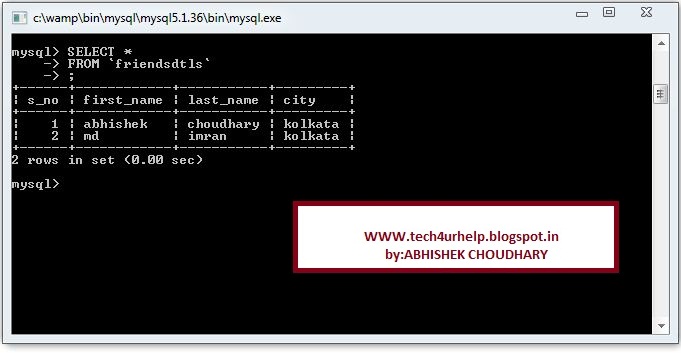
    after  executing the above lines of query  your table will look like as below
    Here you go a sample video how to insert data into table .you can view this video on my you tube channel as well @  http://youtu.be/yJl0z84Rh40

    I am interested in hearing your feedback, so that I can improve my articles and learning resources for you.connect with us on facebook, twitter

    Share

    Did you enjoy reading this and found it useful? If so, please share it with your friends:

    SQL Data Types


    In this section we will learn about datatype.
    Data is stored in the form of tables in the database and the data is in differents formats such as name of person ,data of birth of a persion ,etc.So we need to specify the type of data before storing them .so we need to know about different types
    Meaning of “data type”
    Data type used to indicate the type of information in the database columns .Here is the list of database supported by oracle10g.
    visit oracle10gsql server, mysql for more data type supported by oracle10gsql server, mysql.

    I am interested in hearing your feedback, so that I can improve my articles and learning resources for you.

    Share

    Did you enjoy reading this and found it useful? If so, please share it with your friends:

    What is RDBMS?


    -->
    Before we get into RDBMS let get to know 

    what is database mangament system DBMS?

    Database Management System (DBMS): a database management system is a set of programs in an operating system that create and maintains a database .
    • Store and retrive information from that database.
    Ralational Database Management System(RDBMS) :
    Maintains data in table and realationship which are created and maintaind across and among data and tables.

    Differnce between DBMS and RDBMS:Now a days RDBS replace DBMS.
    DBMS:
    • data is stored in a single large table.
    • Whole database is modified.
    RDBMS:
    • database is “broken down” into smaller pices.
    • Changes will affect the entire database.

    Relational Database Management System :
    • developed by Dr E.F.Coddd in the year 1970.
    • all the latest database product use this data model.
    • Entire database is divided into number of table and they are connected through a “key feild”.
    • Data is stored in the form of table in table,data are stored in rows and columns.
    • “key field” is nothing but a column in a table.by using this column different table are link together.
    Relational Database Management System :
    a student database consist of different table like “Personal Details” Table,”Mark ” Table,”Departments” Table and etc. we can relate this table through Register Number because all this table have Register Number column. This column is a key field.
    I am interested in hearing your feedback, so that I can improve my articles and learning resources for you.

    Share

    Did you enjoy reading this and found it useful? If so, please share it with your friends:


    What is normalization?


    • Normalization is the process of oragnizing data in database effetively.
    • In a database normalization is the process of breaking data down into most basic components.
    • We can use this to remove redundancy in data.
    • Database refinement process that organizes a database; so the data in the database are alwas unambiguous.

    Main goal of normalization :
    • to reduces the dublicate entries in the database.
    • Duplicate entries will occupy more memory space and it leads corruption because same information is stored in different location .
    Normalization is the process to avoid this problem, in normalization a set of guideline to be followed to avoid this problem.
    • In 1970 ,Edge Codd proposed the first normal form which is represented as 1NF and then he defined normal form two and three.since then several other noramlform have been defined 4NF,5NF and some other normalform are also defined.

    First normal form (1NF):
    • first normal form sets the very basic rule for an oranised database.
    • Elliminate duplicate columns from the same table.
    • Create seperate table for each group of releted data and identify each row with a unique column or set of columns(primary key).

    Second normal form (2NF):
    • second noramal form further address the concept of removing duplicative data.
    • The table should meet all the requirements of the first normal form and it removes subset of data that apply to multiple rows of the table and place them in separate table.
    • Relationship between these new table are created and their relationship are created the use of foregin keys.

    Third normal form (3NF):
    • third noramal form (3NF) goes one large step further over other two normal forms.
    • The database must meet all the requirements of the seconds form and it removes columns that are not dependent upon the primary key.
    Fouth normal form (4NF):
    • fourth normal form(4NF) has one additional requirement over the other normal forms.
    • The database in this normal form should meet all the requirements of other three normal forms and forms and a relation is in 4NF if it has no multi-value dependencies.
    Related article:
    I am interested in hearing your feedback, so that I can improve my articles and learning resources for you.