COMMIT

 In the previous section we have discussed about
 but in this section we  are going to study about how to save changes pemanently in a database .

Commit statement:

  • Commit is a transaction control statement it is used to set the changes permanently in the database.
  • Used to instruct the database to save all changes made  to the database permanently .
  • To end a transaction within  a database and make all changes visible to other users of the database.
Syntax:

COMMIT;

Example:

Lets say we are going to update the salary of all employees  with 100.

  Update emp set salary=salary+100;


After updating the table the changes is not made to visible to other user because the same database is used by many user.so we have to commit the transaction to make it visible to other user and changes made permanently.

Commit;


 After commiting the changes made visible and saved permanently.

Note: DDL statements are autocommit.So be carefull while using DDL statements during the transaction.

Related Article:

 I am interested in hearing your feedback, so that I can improve my articles and learning resources for you.connect with us on facebook, twitter

Share

Did you enjoy reading this and found it useful? If so, please share it with your friends:

Transaction control language

 In this lesson we are going to study about Transaction control language.

Transaction control language(TCL):

  There are three transaction control statement used to control transaction they are :
  1.  Commit
  2.  Rollback
  3.  Savepoint

All changes in oracle database can only be done within a transaction .

Transaction :
  • Transactions is an execution of sequence of SQL statements which modifies the data in the database.
  • Transactions should either end with a COMMIT or ROLLBACK statement.
  • Transaction ensure the data consistency.
Transaction consists of DML statements that make up one consistent change to the data.

Example:

  A transfer of funds between two accounts should include the debit to one account and the credit to another account in same transaction .Both actions should either fail or succeed together,the credit should not be committed wihtout the debit .

Related Article:

 I am interested in hearing your feedback, so that I can improve my articles and learning resources for you.connect with us on facebook, twitter

Share

Did you enjoy reading this and found it useful? If so, please share it with your friends:

Updating a table

 In this lesson we are going to study about how to update  a table data.

Update:
  • Changing the existing data.
  • Must include "where" clause in update statement to change perticular records.

Syntax:

UPDATE Table Table_name Set
Column1=Value..,ColumnN=Value
Where condition


   In this syntax update table,Set and Where are all keywords.Table_name specifies the name of the Table .Column1... are the name of the columns where we are going to change the value in a where clause we specifies the condition to perform the update statement.


Example:-

 Single-rows : Update the city to kolkata of employee abhishek

update empdtls set
city="kolkata"
where emp_name="abhishek"
 
Multiple-rows: salary incremented by 1000 of all MANAGER.

update empdtls set
salary=salary+1000
where job="MANAGER"
 
All-rows: salary incremented by 1000 of all employees

update empdtls set
salary=salary+1000


 I am interested in hearing your feedback, so that I can improve my articles and learning resources for you.connect with us on facebook, twitter
Share

Did you enjoy reading this and found it useful? If so, please share it with your friends:

Truncating Tables

In this lesson we are going to study about how to truncate table.

  Truncate statement remove all the rows from the table also perform these task.
  • It De-allocates all space used by the removed rows and it also sets the NEXT  storage pointer to the free space .
  • More efficient than dropping and re-creating a table .
  • Removing rows with the TRUNCATE statement can be faster than removing all rows with the DELETE statement.
Syntax:

TRUNCATE Table Table_Name;

  In this syntex TRUNCATE is the keyword table name specify the name of the table to truncate .

Example:  Truncate the table : test_employees

TRUNCATE Table test_employees;

Related article :
I am interested in hearing your feedback, so that I can improve my articles and learning resources for you.connect with us on facebook, twitter

Share

Did you enjoy reading this and found it useful? If so, please share it with your friends:

Dropping a table

 In this lesson we are going to study about how to drop a table.
  • Drop table  removes the table and all its data from the database entirely.
  • Drop table is different from deleting all records from the table .
  • Deleting all of the records in the table leaves the table including column and constraint information .
  • Dropping the table removes the table definition as well as all of its rows.
Syntax:

DROP TABLE Table_name;

   In this syntex drop table is the keyword and the table name specify the name of table to be droped.

Example:  Drop the temp_employees table

drop table temp_employees.

Related article:
 I am interested in hearing your feedback, so that I can improve my articles and learning resources for you.connect with us on facebook, twitter

Share

Did you enjoy reading this and found it useful? If so, please share it with your friends:

Copying Data

In this lesson we are going to study about how to copy a data from one table to another table.

Syntex:

Insert into Table_name (column1,column2,....,columnN)  Subquery

here insert is a keyword and into specify the table in which we are going to insert the data and Table_name specify the name of the table ,column1,column2,...,columnN is the name of columns.

Example:

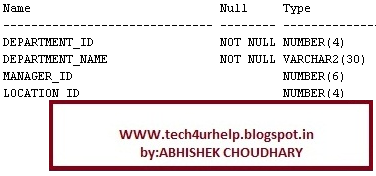
Consider a table : departments.


Now we have created a table: dept with same columns.

create table dept
(id number(7),
name varchar2(25)
)


   We can copy the rows in a insert statement.here we are going to insert the data in newly create dept table from the table departments

insert into dept (id,name)
(select department_id as id,department_name as name
from departments)


   In this insert statement we have written a select statement as subquery.In the select statement we have selected the department_id and given the alias name id,and department_name with alias name name.


I am interested in hearing your feedback, so that I can improve my articles and learning resources for you.connect with us on facebook, twitter

Share

Did you enjoy reading this and found it useful? If so, please share it with your friends:

Deleting Data

  The delete statement delete the single row as well as multiple rows from the table.

Syntax:

Deleting all rows:

     DELETE FROM Table_name;

     Here delete is the keyword and from specify the table in which we are going to delete the data  and table_name specify the name of the table.in this delete statement we can add a where clause  to delete rows according to some condition we can specify the where clause in the end of the statement.

Deleting selected rows:

    DELETE FROM Table_name WHERE  condition;


Example:


Delete all the employee whose department_id is 50

delete  from employee2
where dept_id=50


Delete all the employee

delete  from employee2


  The first statement delete only two rows i,e emp_id 198,199 rows will be deleted after processing this statement by oracle server where as the second statement delete all the rows from the employee2 table .So be carefull when you are writting any delete statement .For safety create a savepoint then perform the any delete operation so that u can rollback your data .we will learn about savepoint and rollback in coming lession .


I am interested in hearing your feedback, so that I can improve my articles and learning resources for you.connect with us on facebook, twitter

Share

Did you enjoy reading this and found it useful? If so, please share it with your friends: