Join with ON clause

In this lesson we are going to study about Join with ON clause in a database.

Join with ON clause:
  • The join condition for the natural join is basically an equijoin of all columns with the same name.
  • To specfify arbitary conditions or specfify columns to join,the ON clause is used.
  • The join condition is separated from other search conditions.
    The ON clause makes code easy to understand.
Example:
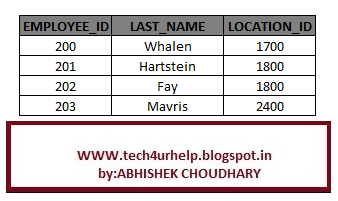
we are having two table DEPARTMENTS and EMPLOYEES with comman column department_id .So, we can join this two table with ON  clause.


SQL:

Select e.employee_id,e.last_name,e.department_id,d.location_id
From employees e join departments d
On (e.department_id=d.department_id);


OUTPUT:


 Same result with equijoin :

Select e.employee_id,e.last_name,e.department_id,d.location_id
From employees e join departments d
where  e.department_id=d.department_id;


Related Article
I am interested in hearing your feedback, so that I can improve my articles and learning resources for you.connect with us on facebooktwitter

Share

Did you enjoy reading this and found it useful? If so, please share it with your friends:

Join with Using clause

In this lesson we are going to study about Join with Using clause in a database.

Join with Using clause:
  • Using clause is used to join the tables where the column in those tables shares a same name .
  • Join operation carried out in these two table according to the values in these two columns.
  • The columns listed the using clause cannot have any qualifier in the
    statement and it should not include the where clause .
     It means we can’t select the value of these two columns in output and we
can’t use these columns in where clause.

Example:
we are having two table DEPARTMENTS and EMPLOYEES with comman column department_id .So, we can join this two table with Using clause.


SQL:

select e.employee_id,e.last_name,d.location_id
from employees e join departments d
using (department_id)


OUTPUT:

 same result with equi join:

select  e.employee_id,
e.last_name,d.location_id
from employees e , departments d
where e.employee_id =d.department_id


NOTE:
  • Do not use a table name or alias in referenced columns.
  • The NATURAL JOIN and USING clause are mutually exclusive.

Related Article
I am interested in hearing your feedback, so that I can improve my articles and learning resources for you.connect with us on facebooktwitter

Share

Did you enjoy reading this and found it useful? If so, please share it with your friends:

Natural Join

In this lesson we are going to study about Natural Join in a database.

Natural Join:

  • This join is having a special features ,with the use of this join no need to specify the join condition explicitly.
  • This type of join offer a further specification of equi join .
  • We have to specify the keyword Natural join in the join statement.
  • Natural Join automatically joins two table based on columns in the two table which have same datatype and names.
Example: EMPLOYEE table and DEPARTMENTtable have a same column DepeartmentID and same datatype.
so we can join this two table using
NATURAL JOIN.


SQL :

SELECT *
FROM employee
NATURAL JOIN department;

Note:

  • If we write a where clause of a select statement with two or more table then the order parser will start the join operation from right to left.In this case the table name which is written last will be processed,
  •  The  join can happen only on columns having the same names and same data types in both the table .If the columns have the same name ,but different data types,then the NATURAL JOIN syntex causes an error.


Related Article
I am interested in hearing your feedback, so that I can improve my articles and learning resources for you.connect with us on facebooktwitter

Share

Did you enjoy reading this and found it useful? If so, please share it with your friends:

Self Join

In this lesson we are going to study about Self joins in a database.

Self Join: 
  • In order to join a table to itself we use the self join.
  • This type of join is used to compare values between two columns in the same table .

Example:-To find the name of Abhishek and Aritra manager we need to


  1. find in EMPLOYEE table by looking the Emp_name columns.
  2. find the manager number from Manager_id.
  3. find the name of manager with manager_id.


sql query :-


select
      emp.Emp_Name as Employee_name,
      manager.Emp_Name as manager_name
from  employees emp,
      employees manager
where emp.manager_id=manager.emp_id


OUTPUT: 


In simulate two table in the from clause there are two  aliases ,namely emp and manager for the same table ,EMPLOYEE.


Related Article
I am interested in hearing your feedback, so that I can improve my articles and learning resources for you.connect with us on facebooktwitter

Share

Did you enjoy reading this and found it useful? If so, please share it with your friends:

Non Equi joins

In this lesson we are going to study about Non Equi joins in a database.
Non Equi Join:
Non eque join is a type of join in which we can join two table with the join condition where the join condition uses other than equal operator “=”.

Example: In the below diagram we are having two table EMPLOYEES and JOB_GRADES.
 EMPLOYEES tabel contain the lastname and salary of the employee and JOB_GRADE contain the grading (Gra),lowest salary and highest salary.
A relation between the two table is that the salary columns in the EMPLOYEES table must be between the values in the Lowest_sal and Highest_sal columns of the JOB_GRADES table.The relationship is obtained using an operator other than equal(=).
Non Equi join Sample:


select e.last_name,e.salary,j.gra
from employees e,job_grades j
where e.salary between j.lowest_sal and j.highest_sal

NOTE: Other condition ,such as <= and >= can be used ,but BETWEEN is the simplest .Remember specify the low value first and hight value last when useing BETWEEN.
Table aliases used for reduce the code length and as well as the execution time .

Related Article
I am interested in hearing your feedback, so that I can improve my articles and learning resources for you.connect with us on facebooktwitter

Share

Did you enjoy reading this and found it useful? If so, please share it with your friends:

Equi Join

In this lesson we are going to study about Equi joins in a database.
Equi Join or Theta Join: 
  • An Equi Join is a type of joins the tables based on the columns in two table with same values.
  • In Equi join ,the join condition must have an Equility operator.
  • Using other comparison operators (such as <) disqualifies a join as an equi-join.
Example: In the below diagram we are having two Table,Table:A and Table:B. In Table:A we are having five records and Table:B is having four
 records which is also in Table:A  if  we do the Equi join on Table:A column X with Table:B column Y,
 this will retrun the record which are common in both the table A column X and Table:B column Y .
NOTE:   The columns X of Table A and columns Y of Table B Datatype must be same and the resulting table is having all the columns of Table:A ,and Table:B.

Syntex:


Explicit Equi join:

SELECT *
FROM Table1
JOIN Table2 ON  Table1.columnX=  Table2. columnY ;

Implicit Equi join:

SELECT * FROM  Table1 ,  Table2  WHERE  Table1.columnX=  Table2. columnY ;

just have a look on below video and try to Cross Join table by your self and you can download the sql scrpit used in this video from here DOWNLOAD LINK


    Related Article
    I am interested in hearing your feedback, so that I can improve my articles and learning resources for you.connect with us on facebooktwitter

    Share

    Did you enjoy reading this and found it useful? If so, please share it with your friends:

    Cross join

    In this lesson we are going to study about Corss joins in a database.
    Cross Join  or Cartesian Product:

    • Each row from the first table is combined with the each rows from the second table.
    • Rows in the result table is the product of rows in each table.
    • For large no of rows ,it takes longer time.
    • It does not include any join condition .
    • A Cross Join B Result table as  A*B.
    Example1:In the below diagram we are having two table's Table:A,Table:B .Table:A is having one column X

    with three data and Table:B is having one column Y with two data.So the value of  m=3 and n=2.
    So when we are doing cross join of Table:A with Table:B this will return a table which have
    m*n =3*2
           =6(Record)
    i.e each row of one table is mapped with each row of second table.


    Example2:  In the below diagram we are having two table's Table:R,Table:S .Table:A is having Two column A,column B

    with three data and Table:S is having two column B.column C with two data.So the value of  m=3 and n=2.
    So when we are doing cross join of Table:A with Table:B this will return a table which have
    m*n =3*2
           =6(Record)
    NOTE: Result table is having all columns of Table:R,Table:S

    Syntax:
    Explicit cross join:

    SELECT *

    FROM Table1
    CROSS JOIN Table2


    Implicit cross join:

    SELECT *
    FROM  Table1 , Table2;

    just have a look on below video and try to Cross Join table by your self and you can download the sql scrpit used in this video from here DOWNLOAD LINK

     Related Article
    I am interested in hearing your feedback, so that I can improve my articles and learning resources for you.connect with us on facebooktwitter

    Share

    Did you enjoy reading this and found it useful? If so, please share it with your friends: